
I have about 14,000 notes in Anki. Some are Spanish, French, and Latin decks. The rest are tech decks (DDIA, System Design, Go, Kubernetes) that I write as markdown in Obsidian and sync to Anki with the Yanki plugin.
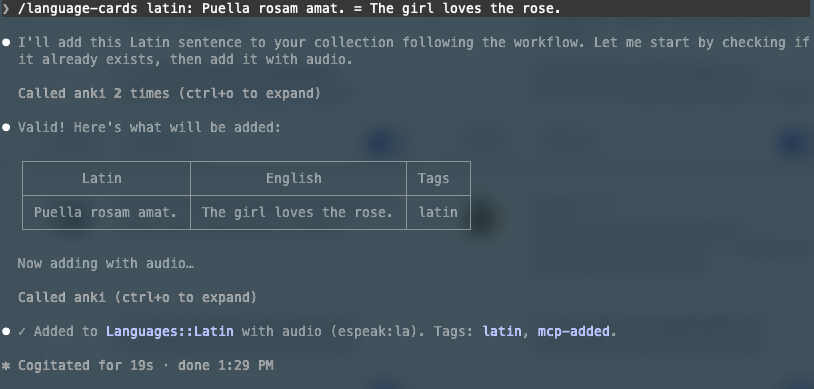
I wanted to tell Claude “add this word to my Latin deck” and have it happen, with audio. So I wrote anki-mcp, an MCP server for it.
What MCP is
An MCP server is a normal program that exposes functions. The host (Claude Code, Claude Desktop, Cursor) runs the model, and the model decides when to call them. The server itself has no LLM, no API key, and costs no tokens.
Mine talks to Anki through AnkiConnect, an add-on that serves a local HTTP API on port 8765. The server runs over stdio. The host starts the process and talks JSON-RPC over stdin and stdout. So a stray print() breaks the protocol. Logs go to stderr.
The server has these tools.
| Tool | What it does |
|---|---|
list_decks | Decks with counts and where they come from (anki, yanki, or mixed) |
describe_deck | Works out a deck’s note types, fields, audio field, tags, and samples |
search_notes | Anki search syntax, paginated previews |
get_notes | Full content for specific notes |
get_weak_cards | The cards I forget most |
add_notes | Batch add with validation, dry run, duplicate check, optional audio |
add_audio | Adds audio to existing notes that don’t have it |
get_deck_profile / set_deck_profile | Saved per-deck conventions (note type, audio field and voice, how to fill each field, tags) |
It’s written in Python with the official MCP SDK. The code is small. Most of what I learned was about how to design the tools.
The model is the user
The model sees each tool’s name, description, and input schema. That text is the whole interface, so the descriptions are in fact prompts. They say when to use a tool, not only what it does. The query field in search_notes, for example, lists real examples of Anki search syntax.
AnkiConnect has around 100 actions but I didn’t mirror them. get_weak_cards calls two of the actions and sorts the result. “What am I forgetting?” is the question an agent actually asks, we don’t want to create an API in the MCP form.
Size matters. Dumping 14,000 notes into a context window is not a good option. Search returns short previews with HTML stripped, pages through results with limit and offset, and reports a total. For full content there’s get_notes.
Errors say what to do next
Compare these two errors.
Deck not found.Deck 'Golang' does not exist. Similar: ['Go', 'Leetcode::golang']. Use list_decks.With the second one, the agent fixes its own mistake. The first version of the suggestions used substring matching and missed typos like Spansh. difflib.get_close_matches from the standard library fixed that.
In version 2 of the Python SDK, only a ToolError message reaches the model. Any other exception becomes Error executing tool X, and the useful part is lost. So AnkiError inherits from ToolError.
Also, version 2 renamed FastMCP to MCPServer. Most tutorials still show version 1, and so does most LLM training data. I had to read the package source.
Rules in the server, habits in the skill
The tech cards live in Obsidian. If an agent adds one straight to Anki, it never makes it back to Obsidian and the next sync will remove it because Yanki syncs one way. I wanted this to be taken into account no matter which agent or model is calling. So I split it in two.
- The server enforces it.
add_notesrefuses decks owned by Yanki, and the error says to write the card in Obsidian instead. - A skill carries the workflow. The
flashcardsskill knows my Yanki markdown format and which vault folder each deck lives in. It uses the Obsidian MCP server I already had, so I didn’t have to write one.
list_decks also reports each deck’s source, so the agent can see the rule before it hits the error.
Working out “source” took one correction. My first rule was “any deck with Yanki notes belongs to Yanki”. Then I looked at the counts. My Latin deck had 2 Yanki notes out of 464. The rule became yanki only if all of a deck’s own cards come from Yanki, and mixed if some do.
Deck profiles
My first language-cards skill had a table of my decks, note types, and voices in it. It worked for me, but nobody else could use it, and I had to edit the skill every time I changed something in Anki.
So now there are deck profiles. They hold the things describe_deck can’t guess, like which note type to use, which field gets the audio and with what voice, how to fill each field, and rules like “nouns include the article”. They live in ~/.config/anki-mcp/profiles.json, outside of Anki, so saving one never triggers a sync. The skill reads the profile and follows it. If a deck doesn’t have one yet, it runs describe_deck, proposes a profile, and saves it after I say yes.
Here’s my Latin one, a bit trimmed.
"Languages::Latin": {
  "note_type": "Basic (and reversed card)",
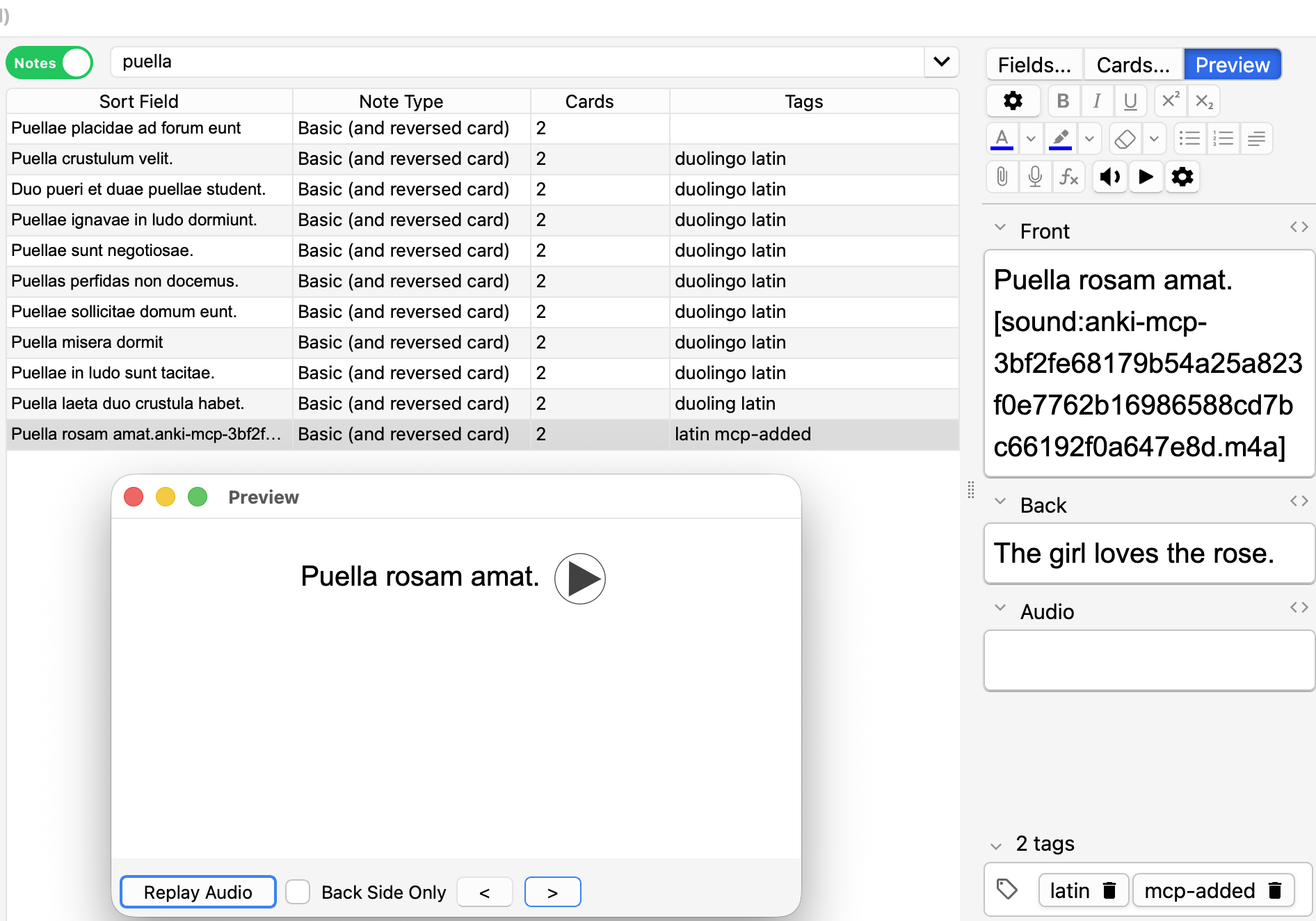
  "audio": { "field": "Audio", "voice": "espeak:la", "text_field": "Front" },
  "fields": {
    "Front": "Latin word or sentence",
    "Back": "English translation"
  },
  "tags": ["latin"],
  "conventions": [
    "Also tag 'duolingo' if the sentence comes from Duolingo.",
    "Voice is eSpeak on purpose: Google's 'la' is not Latin."
  ]
}
set_deck_profile checks the profile against Anki before saving. The deck and note type have to exist, the fields have to belong to that note type, and the voice has to work. I’d rather have a typo fail right away than sit in the file and break something weeks later.
describe_deck infers things from the data, and it recomputes them every time. The profile is what I decided, and only I should change it. So the tool description tells the agent to save a profile only after I confirm it.
Latin audio
All my Spanish and French cards had audio, made by the HyperTTS add-on (for Anki desktop). I generated the audio with it using Google Translate’s voices for the most part. The gTTS library calls the same voices, so new cards sound the same.
gTTS also lists la for Latin. It produced a valid MP3, and every automated check passed. However, the pronunciation is either the Italian way of reading (Church Latin), or English pronunciation of Latin text. In any case, it is not classical Latin.
I tried to find it in other popular TTS tools. Microsoft has no Latin voice among its 322. Meta’s MMS-TTS model pronounces Latin the Italian way, which is not what I’m learning. eSpeak NG’s Latin voice sounds extremely robotic, but it follows Latin rules, so that’s the one I picked.
So a voice being on the “supported” list doesn’t mean much. Someone has to actually listen to it before it becomes the default. macOS has the same issue. say -v Nobody falls back to the default voice instead of failing. The server now checks the voice before generating anything, and turns silent fallbacks into errors.
The voice is one string, such as es-MX, espeak:la, or macos:Alice. The agent already knows how to pass a string, so there is no separate engine field or anything like that, to not produce more rules about which combinations are valid.
Feature visibility in different sessions
At first, audio was only an option on add_notes. Later, in a different session, I asked Claude to “add audio to my Latin cards”. It saw no tool for that and offered to write a script using Google’s Latin voice, which I had already rejected.
The knowledge was in my notes and in a skill, but that session didn’t load either. So I added a separate add_audio tool, and its description says that Latin uses espeak:la and Google’s la is not Latin.
The same bug showed up in dry runs. The voice check used to run only while generating audio, so a dry run approved Google la. Now the check runs first, in dry runs too.
A fake Anki for testing
For tests I wrote FakeAnki, an in-memory fake version that handles the 15 or so AnkiConnect actions the server uses. It raises an error on any action or search term it doesn’t model, so it can’t just quietly drift away from what the server needs.
Its first run found two bugs in the function that strips HTML (which also prepares text for audio). left a double space, and inline tags turned into spaces, so Marcum <b>excitamus</b>. became Marcum excitamus . My smoke test against the real collection never caught this, because the notes it checked had no inline HTML.
There are 2 kinds of tests - unit and smoke tests. Unit tests run against the fake Anki in CI. The smoke test talks to the server over stdio, exactly like a host does, against my real collection. It catches things the fake doesn’t know about, like getDeckStats returning only the last part of a deck name, so DDIA::04_Transactions came back as 04_Transactions and subdecks collided.
Try it
You need Anki with AnkiConnect (so unfortunately works only with desktop macOS version for now), uv, and macOS (the offline voices use say and afconvert). Any MCP client can run it straight from GitHub.
uvx --from git+https://github.com/ikristina/anki-mcp anki-mcpTo add it to Claude Code, run this.
claude mcp add anki --scope user -- uvx --from git+https://github.com/ikristina/anki-mcp anki-mcpThe README has configs for Claude Desktop, Cursor, VS Code, and Codex. My own profiles are in examples/profiles.json if you want to start from them. Rename the decks to match yours.
Next steps
There’s a roadmap in the repo. The main thing I fear when using agents is breaking my collection, so anything risky waits until there are backups and a safe way to sync.
Roughly in this order.
- Moving cards between decks and converting note types. Moving is easy. Converting (e.g.
BasictoSpanish) changes the schema, and Anki then wants a one-way full sync, which wipes any reviews on my phone that haven’t synced yet. So the tool itself will check for that, make a backup first, and start with a small batch. - Running it remotely. Right now it only works on my Mac with Anki open. Next would be HTTP with auth, through Tailscale or a Cloudflare Tunnel, plus a queue for when Anki is closed. That way I can add a word from my phone and it shows up later.
- Maybe no desktop at all, talking to AnkiWeb directly. I’m not sure that’s doable yet. I’ll try fastanki with a throwaway account first.
- Evals. A set of prompts with the tool calls I expect (“add these 5 Spanish words” should be one
add_notescall, not five). Mostly I want to know if Haiku is good enough for vocab cards, since that’s what the skill runs on now.
And two small ones. Anki only catches exact duplicates, so cumbre and la cumbre both get in. I’d like the dry run to warn about that. The other is showing deck profiles as MCP resources too. Resources are data you attach to a chat yourself, like @-mentioning a file, so I could pull in a deck’s profile without the agent having to ask for it.
And it’s time for a quiz, as per usual.
Comments